Banning users
Banning with Cosmobot
- Auto-banning
- Bio blacklist
- Guest-bot spam autoban
- Bot inline button blacklist
- Global banning
- Banning in public chats
- Banning in DM with Cosmobot
- Banning multiple users at once
- Global unbanning
- Ban immunity
Auto-banning
Whenever an account joins a group with a name like 'help desk', 'support', 'admin', it will be globally banned immediately. The full list of auto-banned combinations can be found by sending the command #showautoban in DM to Cosmobot (accessible to elevated Cosmobot users only).
Bio blacklist
In addition to names, Cosmobot can auto-ban accounts based on the contents of their Telegram bio. When an account joins a chat, if its bio contains any blacklisted word or phrase (case-insensitive substring match), the account is globally banned. This is useful against scam accounts that advertise a bot or a channel in their bio.
Blacklisted bio entries are managed by elevated users in DM with Cosmobot. Entries are case-insensitive and are provided comma-separated.
Add entries (alias #abbio):
Remove entries: Show the current list:Guest-bot spam autoban
Telegram lets some bots post into a chat without joining it, through a mechanism called guest queries. Scammers abuse this to drop spam from bots that are not members of your group. Cosmobot detects such messages and automatically bans the offending bot globally and deletes its message. If a real user triggered the bot, that user is globally banned as well and their triggering message is deleted.
This is fully automatic and requires no command. Elevated and whitelisted accounts are never affected.
Bot inline button blacklist
Some spam bots post messages with inline buttons (the clickable buttons attached under a message) whose text lures users to scams. Cosmobot can auto-ban a bot whose inline button text contains any blacklisted word or phrase (case-insensitive substring match), and deletes the offending message.
Blacklisted button entries are managed by elevated users in DM with Cosmobot. Entries are case-insensitive and are provided comma-separated.
Add entries (alias #abbutton):
Remove entries: Show the current list:Global banning
When you use a Cosmobot ban command, the account will be banned from every chat where Cosmobot is employed.
There are 3 ways to globally ban scammers and bots. Their commands are different - #ban, #gban, and #cban - but all result in the accounts being banned globally across Cosmobot chats. These bans should be reserved for accounts that you are certain are scammers or bots. Users that you want banned from your group only should be removed with normal Telegram methods (right-click on a message and ban, or remove from the members list).
Banning through a message in the group chat
You can reply to a scammer’s message in the group with #gban or #q to delete the message and globally ban. It will first ban from the group where the message was sent, and follow with banning it globally.

Banning in DM with Cosmobot
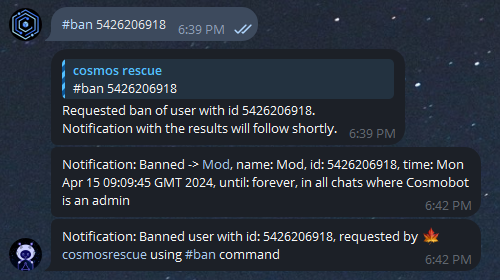
If Cosmobot has "seen" the account, you can DM cosmobot #ban [Telegram user ID] to ban them. For example:
See this to learn how to obtain user ids.
See this to learn how to make Cosmobot "see" user account.
Banning a collection of accounts at once
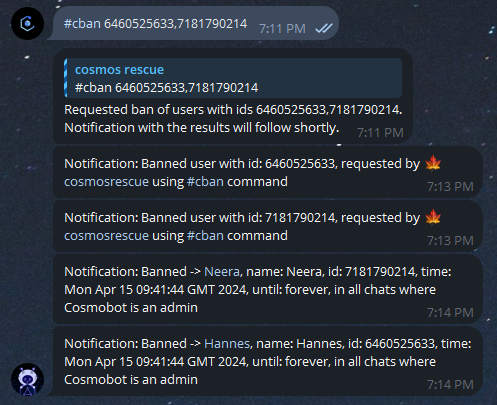
Often accounts join groups in batches, and are able to pass the captcha. When it is obvious that these accounts are bots (similar names, usernames or profile pictures), you can copy their account IDs and use a collective ban - #cban ID,ID,ID.
See this to learn how to obtain user ids.
See this to learn how to make Cosmobot "see" user account.
Global unbanning
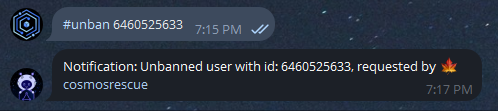
Occasionally people find themselves globally banned by mistake. To unban them, forward their message to Cosmobot to get the 'global ban / global unban' buttons to appear. You can also type the command #unban ID in DM with Cosmobot to unban them. Cosmobot will take some time to respond as he unbans across every chat, but will eventually respond with a notification, provided you have not disabled notifications.
Ban immunity
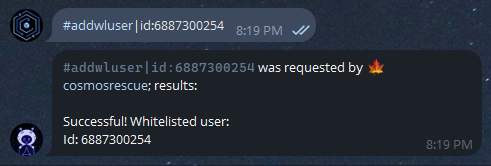
Elevated users are immune to ban with Cosmobot. If a real user gets auto-banned because of name or if there is another legitimate reason to make a user immune to bans with Cosmobot - it can be done with #addwluser command:
See this to learn how to obtain user ids.